Fabric Mirroring vs Copy Job: same Azure SQL database, two different answers


while back I wrote about setting up Mirroring for an Azure SQL Database in Fabric. It worked great, minimal setup, near real time replication, and it's free. Case closed, right?
Not quite. Since then I kept running into the same question from people testing Fabric: "ok but when should I use Copy Job instead of Mirroring?" And honestly the answer isn't as obvious as it looks on paper, because both can replicate the exact same source. So this time I want to take a step back and use a slightly bigger example than a single SalesLT schema: a small ecommerce store with 7 tables (Customers, Orders, OrderLines, Products, Warehouse, StockCurrent and StockMovements), the kind of setup you can see mirrored in the screenshot below.
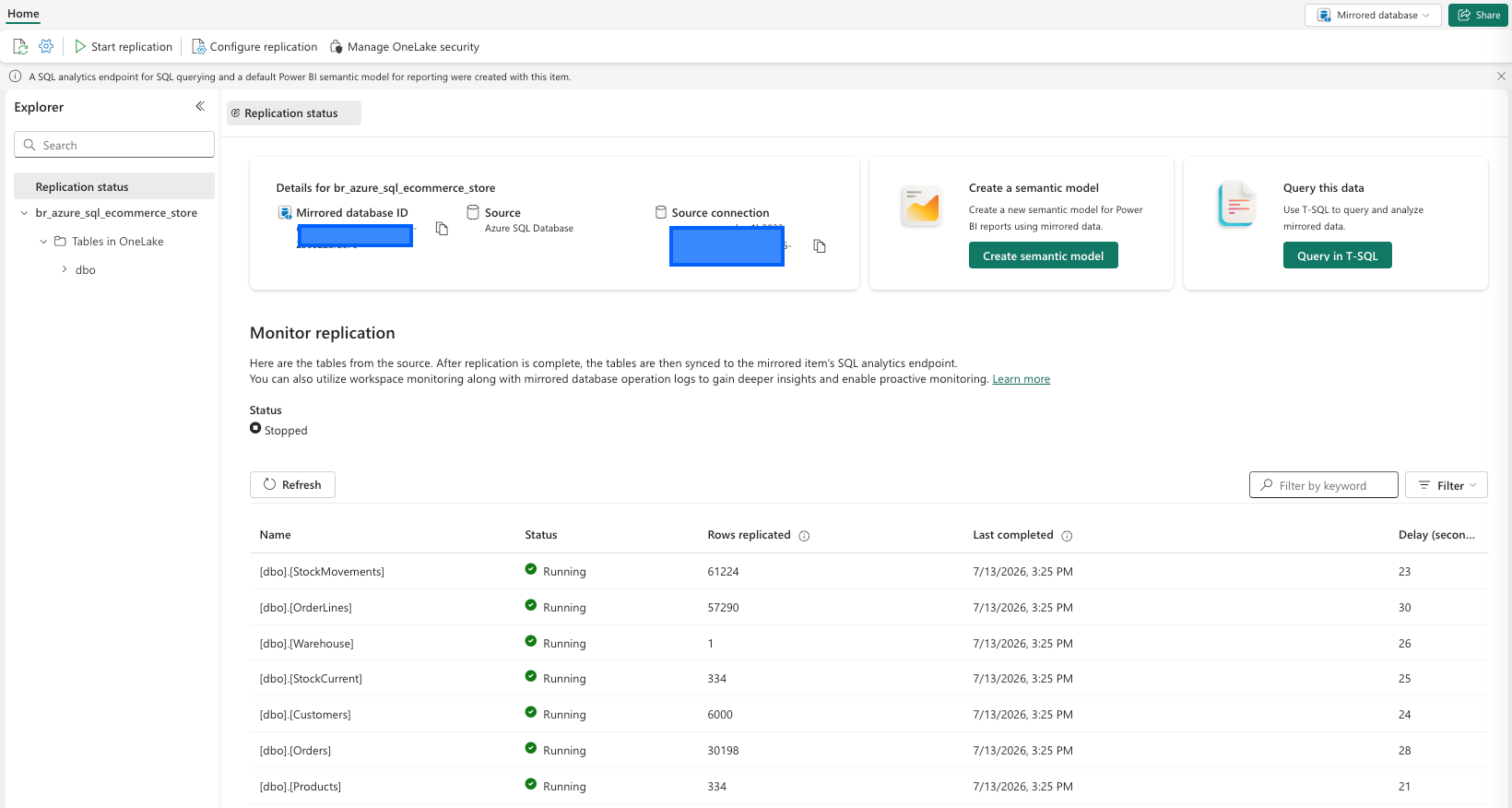
The question isn't "which tool is better." It's "which tool fits this table, in this scenario." And that changes table by table.
The quick mental model: think in medallion layers
Microsoft actually has a decision guide for exactly this (Choose a data movement strategy), and the way they frame it lines up with how most of us already think about data layers.
If you already have your ETL sorted out somewhere else and you just need curated, gold layer data landing in Fabric for reporting, Mirroring is the simplest and cheapest path. No pipelines to build, no incremental logic to manage, and it's free.
If instead you're pulling raw, bronze layer data and you know you'll need transformations, column mapping, filtering or a custom schedule sooner or later, Copy Job is the better starting point. It gives you bulk copy, incremental copy with watermarks, and CDC based replication too, all without having to build a full pipeline.
And if you have real time streaming events (think IoT, clickstream, application logs), neither of these is the right tool. That's Eventstreams territory.
Applying it to the ecommerce scenario
Here's where it gets interesting. Looking at those 7 tables, they don't all belong in the same bucket.
Customers, Products, Orders, OrderLines and Warehouse are close to textbook Mirroring candidates. They're operational tables you want reflected in Fabric as they are, for reporting and dashboards, without touching operational performance on the source. You don't need transformations on the way in, you just want them there, continuously refreshed, read only, and free. Mirror all data, forget about scheduling, done.
StockCurrent and StockMovements are a more interesting case. On the surface they also look like good Mirroring candidates since they need to stay fresh (stock levels change constantly and everyone downstream wants near real time visibility). But if your actual plan is to build a bronze layer where you also want to reconcile movements against current stock, apply business rules to flag anomalies, or bring in similar tables from a second warehouse system that isn't SQL Server, then Copy Job starts making more sense. You get CDC replication there too, but combined with column mapping, upsert behavior and the scheduling flexibility to align it with your transformation logic downstream.
That's really the core of the decision. It's rarely "Mirroring is technically better" or "Copy Job is technically better." It's about how much control you need over what happens to the data on the way in, and whether you already have that logic sorted somewhere else.
A quick side by side
| Mirroring | Copy Job | |
|---|---|---|
| Setup complexity | Minimal, fixed behavior | Low, with advanced options available |
| Transformations, column mapping | No | Yes |
| Custom scheduling | No, continuous only | Yes |
| Copy behavior (append, upsert, override) | No | Yes |
| CDC continuous replication | Yes | Yes |
| Incremental copy (watermark based) | No | Yes |
| Cost | Free | Consumes capacity |
| Destination | OneLake, read only | Any supported destination |
If you want the full breakdown including Copy Activity in pipelines and Eventstreams, the Microsoft decision guide linked above has the complete comparison table.
One thing worth keeping in mind at scale
Something that comes up often in community discussions once people move past a proof of concept with a handful of tables: mirroring dozens or hundreds of tables from a single large operational database is a very different exercise than mirroring 7 tables from AdventureWorksLT. Things like initial snapshot time, replication lag under heavy write load, and how you monitor dozens of tables at once (the Replication status view you see in the screenshot becomes essential here) start to matter a lot more. It's worth testing with a realistic table count and write volume before deciding Mirroring is your answer for an entire large database, rather than just for the curated subset you actually need in Fabric.
And if you don't need to move the data at all
Before reaching for either option, it's worth asking a simpler question first: do you actually need a copy of this data in Fabric, or do you just need to read it from where it already lives? If your data is already sitting in a Fabric supported location such as OneLake, ADLS Gen2 or an existing Fabric item, a Shortcut lets you reference it in place with zero duplication and zero replication lag, since there's nothing to replicate. No storage cost, no sync jobs to monitor, just a pointer to the same files. Mirroring and Copy Job both solve "get data into OneLake." Shortcuts solve "I don't need to move it at all."
Wrapping up
For this ecommerce example, my actual recommendation would be a mix: Mirror the tables that just need to show up as is for reporting, and route the ones that need reconciliation logic or come from a second source through Copy Job. That's the kind of decision the medallion framing makes easy once you stop looking for one universal answer.
I'm a Microsoft Fabric Practice Lead and data engineering consultant with 13 years of experience across BI, cloud data platforms, and analytics engineering. Currently building on Microsoft Fabric.
Follow on LinkedIn · Subscribe to cloudingdata.ai